How to Install & Run Grahamly on Linux
Detailed terminal instructions to make the standalone AppImage executable and launch Grahamly Terminal on your distribution.
Right-Click Properties & Enable “Executable as Program”
Easiest / RecommendedOnce the download finishes in your Downloads folder, you simply need to grant execution permission:
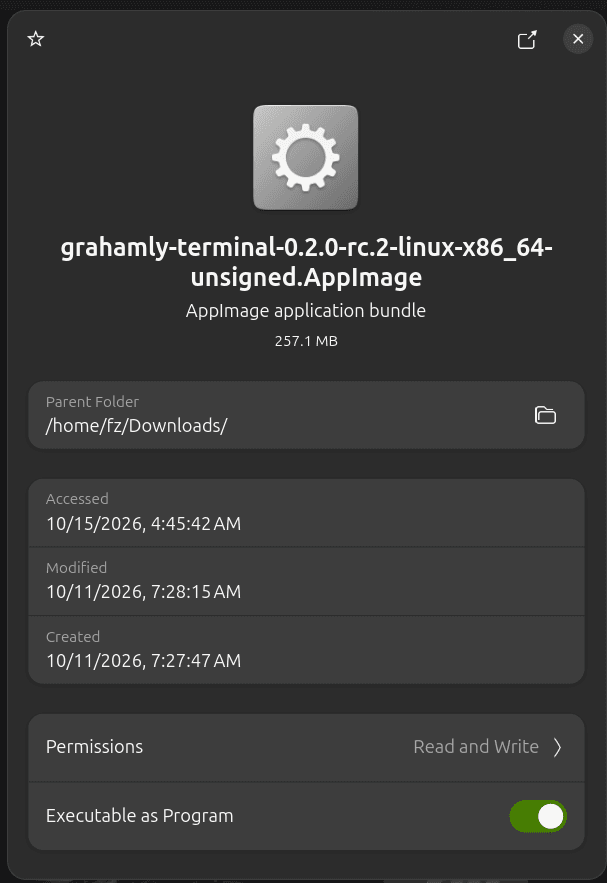
Toggle on “Executable as Program” to run Grahamly with zero terminal commands.
Alternative: Terminal Command (chmod +x)
Open your terminal emulator (Ctrl + Alt + T) in your Downloads folder and run:
chmod +x *.AppImage: Flags the file as executable (exact CLI equivalent of the GUI toggle).&& ./*.AppImage: Launches the app immediately in your user space.FUSE Support (Ubuntu 22.04+ / Debian 12)
If you see an error like “dlopen(): error loading libfuse.so.2” on modern Ubuntu or Debian, install the standard FUSE 2 library:
Grahamly does not log or store any data on terminal. So it's completely private. Because it works locally on your computer to run complex Excel financial models, execute local scripts, and parse private documents, it needs system permissions to operate.
Ready to start modeling?
Launch Grahamly Terminal and start your 7-day risk-free trial.